
نحوه پیگیری موبایل های سرقتی

درباره سایت
آخرین مطالب
- شمای سوکت پاور گرین g650b-ocpt
- سیم بندی هدفون akg
- دانلود برنامه chip45boot2 GUI
- آموزش تعمیر پاور کامپیوتر
- نحوه تست کارت گرافیک
- جرایم رایانه ای
- یازده ترفند اینستاگرام
- 200 سایت پربیننده ایران را با اینترنت نیم بها مرور کنید
- گوشی هایی که از اندروید 8 پشتیبانی میکنند +فهرست
- رباتی که می تواند فایل های شما را در تلگرام اسکن کند!!!
امکانات وب
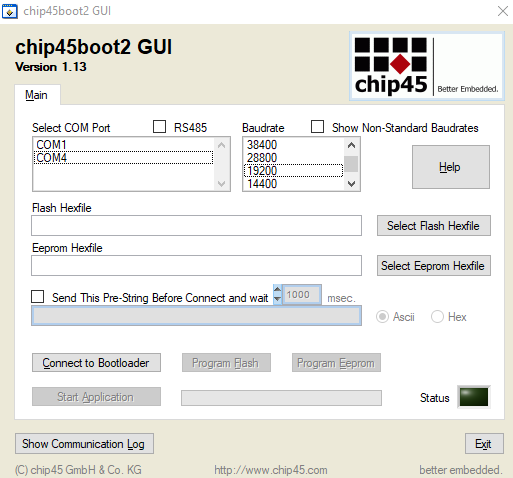
حتما می دونید که به وسیله ی بوت لودر و این قضیه ها می شه 1 ای نوشت که به وسیله ی پورت سریال میکرو خود را پروگرام کنید اما به دلیل سختی کار بسیار کم اند کسانی که سراغ این کار بروند امروز توی اینترنت با وب سایتی روبرو شدم که مشکلات را از سر راه برداشته امیدوارم اموزشی پیدا کنم که این مورد رو کامل آموزش بده در ادامه آموزش های اومده که امیدوارم به دردتون بخوره
من خودم برنامه را به سختی پیدا کردم .گزاشتم اینجا تا شاید یکی راحت تر پیداش کنهو به کارش بیاد
یک نمونه از عمل کرد برنامه
Firmware Update
The firmware of the MXWall can be upgraded by the end-user.
Below are instructions on how to upgrade the firmware of your MXWall:
1. Power OFF the MXWall.
2. Coect the RS-232 cable from computer to the RS-232 port of the MXWall.
3. Download and install the chip45boot2 GUI.
4. Open the chip45boot2 GUI.
5. Click the Select Flash Hex file button and browse for the firmware file.
6. Power ON the MXWall, then click the Coect to Bootloader button on the
chip45boot2. The Status indicator on the lower right hand of the GUI should be green if the
coection is successful. If not successful, click the Coect to Bootloader button again.
7. Click Program Flash to upload the hex file. When finished uploading, the Status indicator
should say "Done".
8. Click Exit and open PuTTY or HyperTerminal and verify if you have successfully loaded the
در این لینک هم فایل بوتلودر خانواده اتمگا رو قرار دادم که فرمتشون hex هست
برچسب:
نویسنده: مریم سلطانی